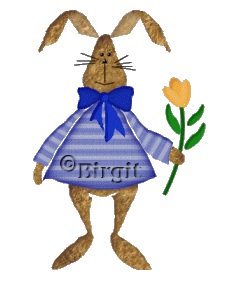
Her we have the rabbit, giving
flowers - to who ?
It's done by selection in Psp 7, but I have now try to make it in psp 9.
Here you have selection zip-fil.
Pattern for the
dress and fur are in these zip-file.
Open the selection zip-file
in Psp's folder,
and pattern in Psp.
1.
Start with a New Image 450 x 450
transparent.
New layer, call it Head.
Open
rabbitfur1 from the pattern-zip.file and sett foreground
to pattern:
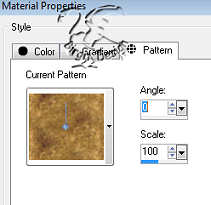
and find the rabbitfur1.
Go to Selection / Load from Disk and find the folder you
open the zip-file with the selection.
Open the head file
and fill with pattern.
Now go to Selection / Invert and
after to Effects / 3Deffects / Drop Shadow with these
settings:
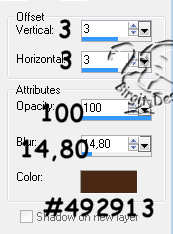
Deselect.
2.
New layer, Ear 1.
Open rabbitfur2
and sett background to pattern.
Open ear1 filen and fill.
Invert and shadow as head but sett color to #71583d.
Deselect.
3.
New layer Ear 2.
Open ear2 filen.
Pattern as head. Fill
Invert and shadow as head, Color #492913.
Deselect.
4.
New layer, Body.
Open rabbitpattern
and sett background to pattern with scale 200 and angle
90.
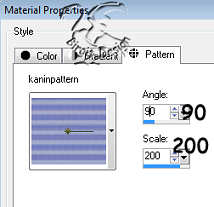
Open body file and fill with pattern.
Invert and
Shadow.
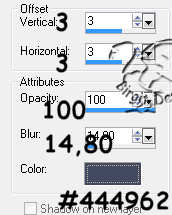
Repeat Shadow but sett V. and H. to -3.
Deselect.
5.
New layer, Right Arm .
Pattern as body,
but sett angle to 120.
Open rightarm file and fill with
pattern.
Invert and Shadow as body but sett V. to 3 and H. to 0
Deselect.
6.
New layer, Left Arm .
Pattern as right arm but sett angle to 30.
Open larm file and fill .
Invert
and shadow as rightarm .
Deselect.
7.
New layer, Leg.
Move this layer
below the body layer.
Forground pattern as head.
Open leg
file and fill.
Invert and Shadow .
Deselect.
8.
New layer, Left hand.
Pattern as leg.
Open l.hand file and fill.
Deselect.
9.
New layer, Right hand.
Open r.hand
file.
Pattern as left hand.
Deselect.
10.
New layer, Bow.
Foreground to #142dac.
Open bow file and fill.
Invert and shadow :
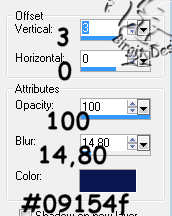
. Repeat shadow
but sett V. to -3.
Deselect.
11.
New layer, Band. Foreground #1835c6.
Open band file and fill.
Invert and shadow as bow but
sett V. and H. to 3.
Deselect.
12.
New layer, Knot.
Open knot file.
Color, invert and shadow as band.
Deselect.
13.
New layer, Stalk.
Move this layer
below right hand layer.
Foreground #0d5d0d.
Open stalk
file and fill.
Deselect.
14.
New layer, Leaf. Foreground #189018.
Open leaf file and fill.
Invert and shadow
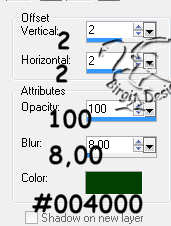
Deselect.
15.
New layer, Flower 1. Foreground # f1ac3f.
Open flower1 file and fill.
Invert and Shadow:
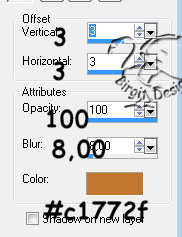
Deselect.
16.
New layer, Flower 2. Foreground #f3b95d.
Open flower2 file and fill.
Invert and shadow. V. 0 and H.
4, color # E99B1F.
Deselect.
17.
New layer, Flower 3.
Opne flower3
file.
Color, invert and shadow as flower2, but sett H. -4.
Deselect.
18.
New layer, Eyes.
Foreground black.
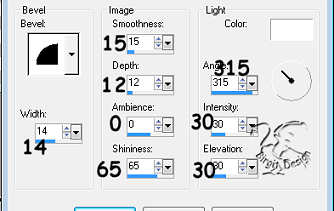
Use Paint Brush,round size 5. Make to eyes. Go to Effects /
3Deffects/ Innerbevel:
.
19.
New layer. Nose. Foreground black.
Use PresetShape/triangle
Make a triangle
Then innerbevel, round.
New layer. Mouth. Foreground black.
Use Pen Tool, single line, size 1. Make a line from nose and
down
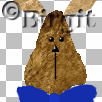
and then mouth
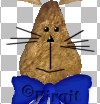
and whiskers
Now it's done and we are here:
Merge visible all layers. Resize 60
- 70%. Save as tube.
I hope you enjoyed this tut and all
are well.