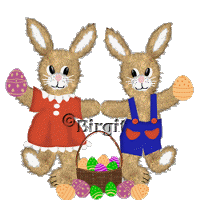
Here we have easterhare with egg in
the basket.
I first done it in PSP 7, but now I have made it for Psp 9.
It's with selections,
which you will find in this zip.file.
Another zip-file contains eggs and
basket tube + furpattern.
Open the selection zip in your Psp's selection folder. The
tube-zip open in Psp's tube folder.
and Pattern open in Psp.
We begin with the boy-hare
Open a New Image 340 x 615 transparent.
1.
New layer, Hare. Open the fur1
pattern from zip-file.
Sett foreground to pattern
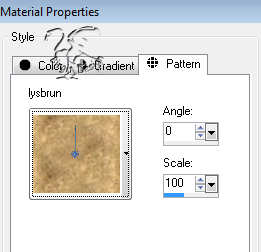
Go to Selection / load from Disk
and find your selection
Open
hare file and fill with pattern.
Go to Selection / Invert
and then to Effect/3Deffects / Drop Shadow with these
settings:
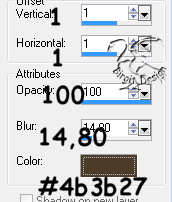
Deselect.
2.
New layer, Muzzle. Open fur2 and
sett to pattern,
same way as to hare. Open muzzle file
and fill.
Invert and drop shadow as Hare, but with
Color #808080.
Deselect.
3.
New layer, Ears. Open ears file .Pattern as muzzle.
Invert and shadow as muzzle
Deselect.
4.
New layer, Eye 1. move the layer
below the muzzle layer.
Open eye1 file and fill with
white.
Deselect.
5.
New layer, eye 2. Open eye2 file and
fill with black.
Go to effect / 3Deffects / Innerbevel
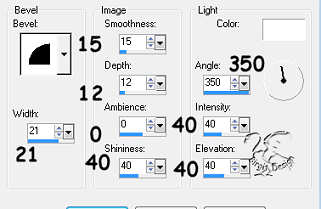
Deselect.
6.
New layer, Sole. Sett foreground to
fur2 pattern.
Open sole file and fill with pattern.
Invert and shadow as ears.
Deselect.
7.
Stand on muzzle layer. New layer,
Nose. Foreground #ffc0c0.
Open nose file and fill.
Deselect.
8.
New layer, Mouth. Foregrunn black,
background closed.
Use Pen Tool, freehand size 2 and paint
the mouth

On the same layer, paint lines on feet with black.
Paint also dots in the muzzle using Paint Brush, round size 2.
Then sett foreground to white and paint some whiskers
using Pen Tool, single line size 1
9.
Now we will use Smudge Brush on the edges.
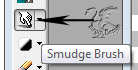
with these settings:

Stand on ear
layer. Push carefull from the middle and out
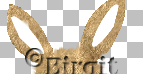
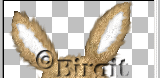
Do the same on all the hare, on muzzle and sole. Remember
to stand on each layer.
but on Hare use size 8
That's mine:
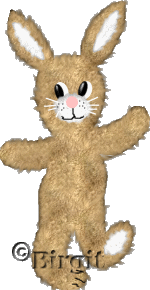
Merge visible all layers and call it
hare. These one we will use to the girlhare.
SAVE as Psp.
1.
Now to the clothes.
New layer,
Trousers 1. Foreground #2124a9.
Open trousers1 file and
fill.
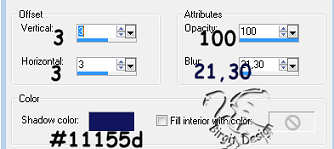
Selection / Float. Effect/3Deffects / CutOut with
these settings:
Deselect
2.
New layer, Trousers 2. Open trousers2
file.
Color, float and cutout as trousers but sett V.
& H. to 1, blur 7,5.
Deselect.
3.
New layer, Pockets. foreground #d14a2f.
Open pockets file and fill. Float and cutout as trousers2
but color #7f2d1f
Deselect.
4.
New layer, Buttons. Open buttons
file. Color as pocket. Innerbevel, soft edge.
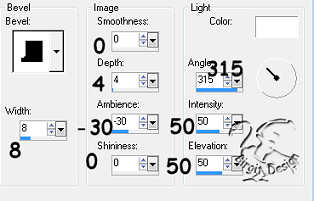
Deselect.
Make 2 dots in the buttons with Paint brush, size 2 and
color black.
Now the boy is ready:
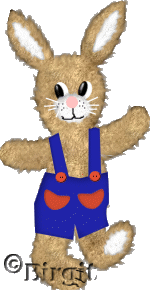
LAGRE.
Now the girl
1.
On Layerpalett, stand on hare layer
(the merged).
Take Shift/D . now we have an copi
of the hare.
Go to Image / Mirror and it's turned.
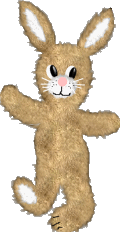
New layer, Dress. Foreground #d14a2f.
Open dress file and fill.
Float and cutout as pockets but
sett V. & H to3, blur 23,8.
Deselect.
2.
New layer, Shadow. foreground #ab3f2d.
Open dressshadow and fill.
Deselect.
3.
New layer, Collar. Foreground hvit.
Open collar file and fill.
Deselect.
4.
New layer, Shadow. Foreground #c0c0c0.
Open collarshadow and fill.
Deselect.
5.
New layer, Lace. Move the layer
below dress layer.
Foreground white. Open lace file and
fill.
Deselect.
6.
New layer, Laceshadow. Foreground #c0c0c0.
Open laceshadow file and fill.
Deselect.
7.
New layer, buttons. Foreground white.
Open buttons2 file and fill.
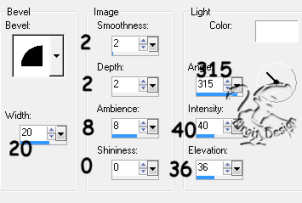
Go to innerbevel with these
settings:
Deselect
Now we have the boy and the girl:
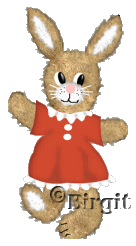
Merge visible both layer palettes.
and rezise each 50%. Save as tube.
If you want to make a picture with
both together you have to open A new Image 500 x 500
transparent.
Copi and past as a new layer, both
harer.
Place them with mover .If you want egg and basket,then
open picture tube and find them.
.If you want egg and basket,then
open picture tube and find them.
So is mine:
I hope all is well.